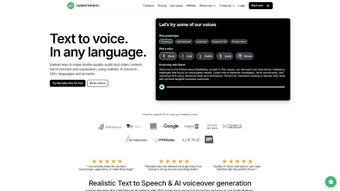

Download Narration Box – AI Voice Generator, Text‑to‑Speech Tool, Multilingual Narration Software
Overview
Narration Box is a cloud‑based AI voice generator that turns written text into realistic, human‑like audio. Designed for creators, marketers, educators, and enterprises, the platform supports more than 20 languages and a broad range of regional accents, making it possible to produce localized voiceovers without hiring multiple voice actors. With a library of over 300 AI narrators, users can select the perfect tone—whether it’s a calm documentary voice, an enthusiastic podcast host, or a friendly tutorial guide.
The subscription‑based service includes built‑in audio widgets, dedicated audio pages, and detailed analytics, enabling you to embed voice content on websites, track listener engagement, and even monetize podcasts directly from the dashboard. Because everything runs in a secure web environment, there’s no need to install heavyweight software on Windows, Mac, Android, or iOS devices; you simply log in, paste your script, choose a voice, and download the finished MP3 or WAV file. Whether you’re producing audiobooks, e‑learning modules, marketing videos, or corporate training, Narration Box streamlines the entire workflow, cutting production time and cost while delivering studio‑grade sound.
Key Features of Narration Box
- Multilingual Support: Over 20 languages and dozens of regional accents, from US English to British English, Australian, Indian, French, German, Spanish, Mandarin, Japanese, and more.
- 300+ AI Narrators: A diverse catalog of voices ranging from deep‑tone narrators for documentaries to upbeat, conversational speakers for podcasts.
- One‑Click Text‑to‑Speech: Paste any script, select a voice, and generate high‑quality audio in seconds.
- Audio Widgets & Pages: Embed generated clips directly into blogs, landing pages, or LMS platforms using customizable widgets.
- Analytics Dashboard: Real‑time tracking of play counts, listener geography, and engagement metrics to inform content strategy.
- Monetization Tools: Built‑in options to sell audio content, run subscription models, or integrate with popular podcast hosting services.
- Secure Cloud Processing: All audio rendering occurs on encrypted servers, ensuring data privacy and compliance with GDPR.
- Regular Updates & Improvements: Monthly model updates improve voice naturalness, reduce latency, and add new language packs.
- Collaboration Workspace: Teams can share projects, leave comments, and approve voiceovers within the same interface.
- Export Flexibility: Download files in MP3, WAV, or OGG formats, with adjustable bitrate and sample rate for different use cases.
Installation, Usage & Compatibility
Getting Started – No Download Required
Because Narration Box is a web application, you do not need to install any executable files on Windows, Mac, Android, or iOS. Simply navigate to the official website, create a free trial account, and you’re ready to explore the interface. The platform is optimized for all modern browsers, including Chrome, Firefox, Safari, and Edge, ensuring a smooth experience across desktop and mobile devices.
Step‑by‑Step Workflow
- Sign Up / Log In: Register with an email address or use single‑sign‑on options such as Google or Microsoft.
- Choose a Project: Click “New Project,” give it a descriptive title, and set the target language and voice style.
- Paste Your Text: Import scripts from a document, copy‑paste directly, or upload a .txt/.docx file.
- Select a Narrator: Browse the voice library, listen to sample clips, and pick the one that best fits your tone.
- Adjust Settings: Fine‑tune speed, pitch, and volume. You can also add background music or sound effects from the built‑in library.
- Generate Audio: Hit “Create,” and the AI engine will render the voiceover in seconds.
- Review & Edit: Play back the result, use the waveform editor to trim or splice, and re‑generate if needed.
- Publish or Download: Embed the audio widget on a website, share a public link, or download the file for offline use.
Operating System Compatibility
- Windows 10, 11 (any recent version of Chrome, Edge, Firefox, or Safari)
- macOS Monterey, Ventura, and later (browser‑based access)
- Android 9+ (mobile‑optimized web UI)
- iOS 14+ (Safari or Chrome app)
Security & Updates
All data transmitted between your device and Narration Box’s servers is encrypted with TLS 1.3. The service follows ISO‑27001 standards for data protection, and you can enable two‑factor authentication for added security. Since the software lives in the cloud, updates are automatic; you always work with the latest voice models and feature set without having to manually download patches.
Pros and Cons
Advantages
- Extensive multilingual library reduces the need for multiple third‑party TTS services.
- High‑quality, human‑like voices suitable for professional productions.
- Web‑based interface eliminates complex installations and keeps the tool up‑to‑date.
- Analytics and monetization features turn audio content into a revenue stream.
- Collaboration tools streamline team workflows and approval processes.
Drawbacks
- Subscription pricing may be prohibitive for hobbyists who need only occasional voiceovers.
- Internet connectivity is required; offline usage is not supported.
- Advanced audio editing capabilities are limited compared to dedicated DAWs.
- Some niche accents or dialects are still under development.
- Export options are confined to standard audio formats; no direct video integration.
Frequently Asked Questions
Can I use Narration Box for commercial projects?
Yes. The subscription includes a commercial license that permits you to publish voiceovers in advertisements, e‑learning courses, podcasts, and any revenue‑generating content.
Is there a free trial or free tier?
Narration Box offers a 7‑day free trial with access to a limited set of voices and up to 30 minutes of generated audio. This allows users to evaluate quality before committing to a paid plan.
How secure is my uploaded script?
All uploads are encrypted in transit and at rest. The platform adheres to GDPR and ISO‑27001 standards, and you can delete any project permanently from the dashboard.
Can I integrate Narration Box with my existing CMS?
Yes. The service provides embeddable widgets and an API that works with WordPress, Drupal, Joomla, and custom CMS platforms, allowing seamless integration of generated audio.
What file formats can I export?
Narration Box supports MP3, WAV, and OGG exports. You can also choose bitrate (128 kbps, 192 kbps, 320 kbps) and sample rate (44.1 kHz, 48 kHz) to match your project requirements.
Conclusion & Call to Action
Narration Box delivers a compelling blend of AI‑driven realism, multilingual reach, and business‑focused tools that set it apart from generic text‑to‑speech services. Its cloud‑first architecture means you can start creating professional voiceovers from any device—whether you’re on a Windows laptop, a Mac desktop, an Android tablet, or an iPhone. While the subscription cost reflects the depth of the voice library and the analytics suite, the time savings and monetization potential often outweigh the expense for serious creators and enterprises. If you’re looking to upgrade your audio workflow, add a global voice to your brand, or simply test the limits of modern AI narration, the 7‑day free trial provides a risk‑free way to experience the platform.
Ready to transform your text into captivating audio? Sign up for a free trial today and start generating realistic AI voices instantly.



.png)



